
 李昂
40d494fa53
update README_zh.md.
李昂
40d494fa53
update README_zh.md.
|
2 rokov pred | |
|---|---|---|
| .. | ||
| 11.png | 3 rokov pred | |
| 115.png | 2 rokov pred | |
| 12.png | 3 rokov pred | |
| 13.png | 3 rokov pred | |
| 14.png | 3 rokov pred | |
| 15.png | 3 rokov pred | |
| 16.png | 3 rokov pred | |
| 1641178790145-2f026e70-4ba1-4e9a-b05f-c602b2bd8cad.png | 3 rokov pred | |
| 1644129110261-049ad5bb-21af-40e2-9533-a1c8c86790f1.jpg | 3 rokov pred | |
| 21.png | 3 rokov pred | |
| 22.png | 3 rokov pred | |
| 23.png | 3 rokov pred | |
| 24.png | 3 rokov pred | |
| 25.png | 3 rokov pred | |
| 26.png | 3 rokov pred | |
| 31.png | 3 rokov pred | |
| 32.png | 3 rokov pred | |
| 33.png | 3 rokov pred | |
| 34.png | 3 rokov pred | |
| 35.png | 3 rokov pred | |
| 36.png | 3 rokov pred | |
| 41-16594077379821.png | 3 rokov pred | |
| 41.png | 3 rokov pred | |
| 6546.png | 2 rokov pred | |
| README.mdpp | 2 rokov pred | |
| README_zh.mdpp | 2 rokov pred | |
| achivement_list.mdpp | 3 rokov pred | |
| board.mdpp | 3 rokov pred | |
| bsp.mdpp | 2 rokov pred | |
| contributor2021.mdpp | 3 rokov pred | |
| contributor2022.mdpp | 2 rokov pred | |
| contributor2023.mdpp | 2 rokov pred | |
| css.mdpp | 3 rokov pred | |
| make.sh | 3 rokov pred | |
| os.mdpp | 3 rokov pred | |
| syntax.mdpp | 3 rokov pred | |
| 封面图.png | 2 rokov pred | |
README.mdpp

PikaPython
Cross platform ultra lightweight embedded Python engine








中文页 |
Forum |
Documents |
Videos |
BSP |
Package Manager |
Contribute |
Business
[](https://pikastech.github.io/PikaPython/dev/bench/)
# 1. Abstract
PikaPython is an ultra-lightweight Python interpreter that runs with only 4KB of RAM, zero dependencies. It is ready to use out of the box without any configuration required and easy to extend with C.
PikaPython also known as PikaScript and PikaPy.

It's very easy to bind C function to python module with the help of Pika Pre-compiler.Only write the API of python in `.pyi` and the bindings are autoly generated by Pre-compiler.

# Get pikapython:
## Use Online Project Generator
Generator url:
http://pikascript.com
Note: You need the [Community Edition license (Now Free)](https://www.keil.com/pr/article/1299.htm) to build Keil projects, and the version of Keil should be newer than v5.36.
[](http://pikascript.com)
## PikaPython studio
PikaPython serial terminal, script download and package menage tool.
[](https://gitee.com/Lyon1998/pikapython/attach_files/1285327/download)
# Quick Start
You can use [simulation project](https://pikadoc-en.readthedocs.io/en/latest/Keil%20%E4%BB%BF%E7%9C%9F%E5%B7%A5%E7%A8%8B.html) to quick start without hardware,or use the out-of-the-box develop board [Pika-Pi—Zero](https://item.taobao.com/item.htm?spm=a1z10.3-c.w4002-23991764791.11.37216340XZtYt9&id=738387991209).
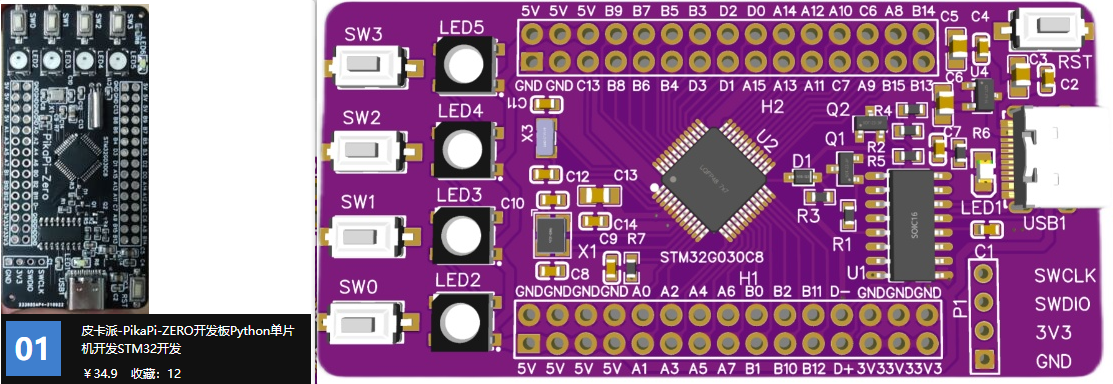
The board based on STM32G030C8T6 MCU, only 64kB Flash, 8kB RAM can run pikapython with total peripheral device (GPIO、TIME、IIC、RGB、KEY、LCD、RGB).
CH340 is deployed to support USB to serial with Type-C USB, support download python script py serial, there are 4 RGB on the board and support the [LCD](https://item.taobao.com/item.htm?spm=a1z10.3-c.w4002-23991764791.12.16f97c58fsLjVk&id=660745643102).
# Related Projects
- ▶️ [pikapython Binding For LVGL](https://github.com/lvgl/lv_binding_pikascript)
- ⭐ [pikapython Bluepill Demo In PlatformIO — Python-like REPL 🐍🔌](https://github.com/maxgerhardt/pikascript-pio-bluepill)
- ⭐ [pikapython Bluepill Demo In GCC 🐍](https://github.com/Chandler-Kluser/pikascript_gcc_bluepill)
- ⏩ [pika_startup_demo](https://gitee.com/kcfkwok/pika_startup_demo) This program demonstrate the 5 startup methods of pikapython.
- 🎮 [PikaPython-OpenHardware](https://gitee.com/Lyon1998/pikapython_openhardware) PikaPython 开源硬件
- 💻 [pikapython-msvc-qt](https://gitee.com/zuto360_460135301/pikapython-msvc-qt) 移植pikapython到windows平台,基于QT,采用MSVC编译器,移植pthread库,支持多线程。
# Document
https://pikadoc-en.readthedocs.io/en/latest/index.html
## How to contribute
https://pikadoc-en.readthedocs.io/en/latest/%E5%A6%82%E4%BD%95%E5%8F%82%E4%B8%8E%E7%A4%BE%E5%8C%BA%E8%B4%A1%E7%8C%AE.html
## Folders
[src](../../tree/master/src) - core code
[bsp](../../tree/master/bsp) - mcu/board support
[port](../../tree/master/port) - OS and package manager
[test](../../tree/master/port/linux/test) - unit test
[document](../../tree/master/document) - developt document
[examples](../../tree/master/examples) - example scripts
[package](../../tree/master/package) - packages and moudles
[pikaCompiler](../../tree/master/tools/pikaCompiler) - pre-compiler write by Rust, used to bind C function to python moudle.
[pikaPackageManager](../../tree/master/tools/pikaPackageManager) - pacakge manager
# 2.Platform support
## MCU support
!INCLUDE "bsp.mdpp"
## Board support
!INCLUDE "board.mdpp"
## OS support
!INCLUDE "os.mdpp"
# 3.Characteristic
### (1)Run environment
Support run in mcu without OS or file system. Can run in everywhere with **RAM ≥ 4kB** and **FLASH ≥ 64kB**,such as stm32g030, stm32f103c8t6,esp8266.
### (2)Develop enviroment
#### Support REPL by serial.

#### Support run and program python scripts by serial.

Support IDEs like Keil, IAR, RT-Thread studio and segger embedded studio to develop C moudle.
Support build tools like CMake, makeFile and Scons.
Zero dependencies, zero configuration, out-of-the-box, easy to integrated into privious C projcet.
Eazy to extern customized C moudles.
Support linux.
### (3)Syntax
Support subaggregate of python 3 standard syntax.
Support class and method define, encapsulation-inheritance-polymorphism and moudles in `.pyi ` of C module.
More Details About Syntax Support
|Syntax|Compile-Time|Run-Time|Shell|
|---|---|---|---|
|Module Define |√|-|-|
|Module Import |√|√|√|
|Class Define |√|√|√|
|Class Inherit |√|√|√|
|Method Define |√|√|√|
|Method Override |√|√|√|
|Method Invoke |√|√|√|
|Argument Define |√|√|√|
|Argument Assignment |√|√|√|
|Object New |√|√|√|
|Object Free |√|√|√|
|Object Nest |√|√|√|
|Control flow |√|√|√|
!INCLUDE "syntax.mdpp"
### (4)Develop standard.
Readability first, nearly never use macro function and global argument.
Complete unit testes based on google test.
# 4.Both talk and show the code:
## E-mail: liang6516@outlook.com
# 5.Demo
The scripts in demos are in the [examples](examples) folder.
## Demo 01 GPIO
View Code
``` python
import PikaStdLib
import STM32G0
mem = PikaStdLib.MemChecker()
io1 = STM32G0.GPIO()
time = STM32G0.Time()
io1.setPin('PA8')
io1.setMode('out')
io1.enable()
io1.low()
print('hello pikapython')
print('mem.max :')
mem.max()
print('mem.now :')
mem.now()
while True:
io1.low()
time.sleep_ms(500)
io1.high()
time.sleep_ms(500)
```

## Demo 02 USART
View Code
``` python
import PikaStdLib
import STM32G0
time = STM32G0.Time()
uart = STM32G0.UART()
uart.setId(1)
uart.setBaudRate(115200)
uart.enable()
while True:
time.sleep_ms(500)
readBuff = uart.read(2)
print('read 2 char:')
print(readBuff)
```

## Demo 03 ADC
View Code
``` python
import PikaStdLib
import STM32G0
time = STM32G0.Time()
adc1 = STM32G0.ADC()
adc1.setPin('PA1')
adc1.enable()
while True:
val = adc1.read()
print('adc1 value:')
print(val)
time.sleep_ms(500)
```

## Demo 04 PWM output
View Code
``` python
import PikaStdLib
import STM32G0
time = STM32G0.Time()
pwm = STM32G0.PWM()
pwm.setPin('PA8')
pwm.setFrequency(2000)
pwm.setDuty(0.5)
pwm.enable()
while True:
time.sleep_ms(500)
pwm.setDuty(0.5)
time.sleep_ms(500)
pwm.setDuty(0.001)
```
## Demo 05 RGB
View Code
``` python
import STM32G0
import PikaPiZero
import PikaStdLib
rgb = PikaPiZero.RGB()
mem = PikaStdLib.MemChecker()
rgb.init()
rgb.enable()
print('hello 2')
print('mem used max:')
mem.max()
while True:
print('flowing')
rgb.flow()
```
## Demo 06 Snake(Need LCD)
View Code
``` python
from PikaObj import *
import PikaStdLib
import PikaPiZero
import STM32G0
# hardware init
lcd = PikaPiZero.LCD()
lcd.init()
lcd.clear('white')
key = PikaPiZero.KEY()
key.init()
time = STM32G0.Time()
x_max = 120
y_max = 150
# snake init
s = PikaPiZero.Point()
w = 9
h = 9
s.x = 50
s.y = 10
len = 0
while len < 3:
b = s
i = 0
while i < len:
b = b.next
i = i + 1
b.next = PikaPiZero.Point()
b.next.x = b.x - 10
b.next.y = b.y
b.next.prev = b
len = len + 1
# ring link
b.next = s
s.prev = b
i = 0
b = s
while i < len:
lcd.fill(b.x, b.y, w, h, 'blue')
b = b.next
i = i + 1
print('snake lengh')
print(len)
# fruit init
f = PikaPiZero.Point()
f.x = 30
f.y = 20
lcd.fill(f.x, f.y, w, h, 'green')
# memory check
mem = PikaStdLib.MemChecker()
print('mem used max:')
mem.max()
# main loop
d = 0
isUpdate = 1
isEat = 0
while True:
if isUpdate:
# isUpdate = 0
# check eat fruit
if f.x == s.x and f.y == s.y:
# have eat fruit
isEat = 1
f.x = f.x + 30
if f.x > x_max:
f.x = f.x - x_max
f.y = f.y + 30
if f.y > y_max:
f.y = f.y - y_max
lcd.fill(f.x, f.y, w, h, 'green')
# move snake by the direction
if d == 0:
x_new = s.x + 10
y_new = s.y
if x_new > x_max:
x_new = 0
elif d == 1:
x_new = s.x
y_new = s.y - 10
if y_new < 0:
y_new = y_max
elif d == 2:
x_new = s.x
y_new = s.y + 10
if y_new > y_max:
y_new = 0
elif d == 3:
x_new = s.x - 10
y_new = s.y
if x_new < 0:
x_new = x_max
if isEat:
isEat = 0
b_new = PikaPiZero.Point()
b_new.x = x_new
b_new.y = y_new
b_new.prev = s.prev
b_new.next = s
s.prev.next = b_new
s.prev = b_new
s = b_new
len = len + 1
print('snake lengh')
print(len)
print('mem used max:')
mem.max()
# drow the snake and fruit
# clear last body
lcd.fill(s.prev.x, s.prev.y, w, h, 'white')
# new body
s.prev.x = x_new
s.prev.y = y_new
# head is last body
s = s.prev
lcd.fill(s.x, s.y, w, h, 'blue')
b = s
i = 0
# scan key
key_val = key.get()
if key_val == 0:
d = 0
isUpdate = 1
elif key_val == 1:
d = 1
isUpdate = 1
elif key_val == 2:
d = 2
isUpdate = 1
elif key_val == 3:
d = 3
isUpdate = 1
```

The maximum RAM usage of these demos is only 3.56K, which is 4.56K if the 1K stack is included, and the maximum Flash usage is 30.4K. Refer to the 20K RAM and 64K Flash of STM32F103C8T6, less than 25% RAM and less than 50% Flash are used.
## About the custom extern module ?
In addition to device drivers, developing custom Python modules for MCU is very easy. The following two demos are extensions of the custom module, which developed python interfaces for the ARM-2D image driver library.
## Boxes~

## Rotating suns~

# 6.Test and develop Core
## Test core in docker (recommend)
[get start with docker](https://pikadoc-en.readthedocs.io/en/latest/get-start_linux.html)
# ✨ Contributors
## [How to contribute](https://pikadoc-en.readthedocs.io/en/latest/%E5%A6%82%E4%BD%95%E5%8F%82%E4%B8%8E%E7%A4%BE%E5%8C%BA%E8%B4%A1%E7%8C%AE.html)
### Contribute Log On 2023
| Contribute log | Contributer |
| --- | --- |
!INCLUDE "contributor2023.mdpp"
Contribute Log On 2022
| Contribute log | Contributer |
| --- | --- |
!INCLUDE "contributor2022.mdpp"
Contribute Log On 2021
| Contribute log | Contributer |
| --- | --- |
!INCLUDE "contributor2021.mdpp"
## Star History
[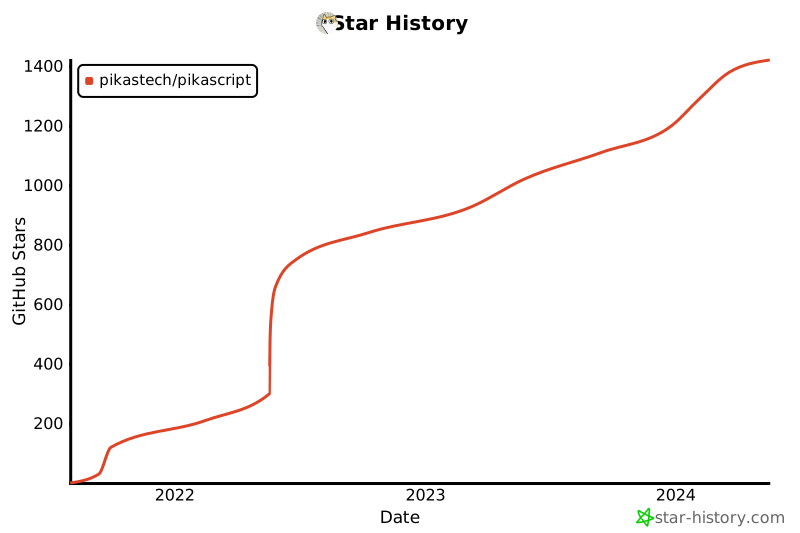](https://star-history.com/#pikastech/pikascript&Date)