
 Chen Yudong
fa270d72c7
ci: using python3 to tun target test
Chen Yudong
fa270d72c7
ci: using python3 to tun target test
|
4 anos atrás | |
|---|---|---|
| .. | ||
| advanced_https_ota | 4 anos atrás | |
| native_ota_example | 4 anos atrás | |
| otatool | 5 anos atrás | |
| simple_ota_example | 5 anos atrás | |
| README.md | 6 anos atrás | |
| ota_workflow.png | 6 anos atrás | |

README.md
OTA Example
Notes: This guide is common for all ota examples
Overview
ESP32 application can do upgrading at runtime by downloading new image from specific server through Wi-Fi or Ethernet and then flash it into some partitions. There’re two ways in ESP-IDF to perform Over The Air (OTA) upgrading:
- Using the native APIs provided by
app_updatecomponent. - Using simplified APIs provided by
esp_https_otacomponent, which adds an abstraction layer over the native OTA APIs in order to upgrading with HTTPS protocol.
Both methods are demonstrated in OTA Demos under native_ota_example and simple_ota_example respectively.
For simplicity, the OTA examples choose the pre-defined partition table by enabling CONFIG_PARTITION_TABLE_TWO_OTA option in menuconfig, which supports three app partitions: factory, OTA_0 and OTA_1. For more information about partition table, please refer to Partition Tables.
On first boot, the bootloader will load the factory app image (i.e. the example image) and then triggers an OTA upgrading. It will download a new image from HTTPS server and save it into the OTA_0 partition. It will update the ota_data partition automatically as well to indicate which app should boot from in the next reset. The bootloader will read the content in ota_data partition and run the selected application.
The OTA workflow can be demonstrated as in the following diagram:

How to use the examples
Hardware Required
To run the OTA examples, you need an ESP32 dev board (e.g. ESP32-WROVER Kit) or ESP32 core board (e.g. ESP32-DevKitC). If you want to test the OTA with Ethernet, make sure your board has set up the Ethernet correctly. For extra information about setting up Ethernet, please refer to Ethernet examples.
Configure the project
Open the project configuration menu (idf.py menuconfig).
In the Example Connection Configuration menu:
- Choose the network interface in
Connect usingoption based on your board. Currently we support both Wi-Fi and Ethernet. - If you have selected the Wi-Fi interface, you also have to set:
- Wi-Fi SSID and Wi-Fi password that your ESP32 will connect to
- If you have selected the Ethernet interface, you also have to:
- Set PHY model under
Ethernet PHY Deviceoption, e.g. IP101.
- Set PHY model under
In the Example Configuration menu:
- Set the URL of the new firmware that you will download from in the
Firmware Upgrade URLoption, whose format should behttps://<host-ip-address>:<host-port>/<firmware-image-filename>, e.g.https://192.168.2.106:8070/hello-world.bin- Notes: The server part of this URL (e.g.
192.168.2.106) must match the CN field used when generating the certificate and key.
- Notes: The server part of this URL (e.g.
Build and Flash
Run idf.py -p PORT flash monitor to build and flash the project.. This command will find if partition table has ota_data partition (as in our case) then ota_data will erase to initial. It allows to run the newly loaded app from a factory partition.
(To exit the serial monitor, type Ctrl-].)
See the Getting Started Guide for full steps to configure and use ESP-IDF to build projects.
Example Output
Run HTTPS Server
After a successful build, we need to create a self-signed certificate and run a simple HTTPS server as follows:
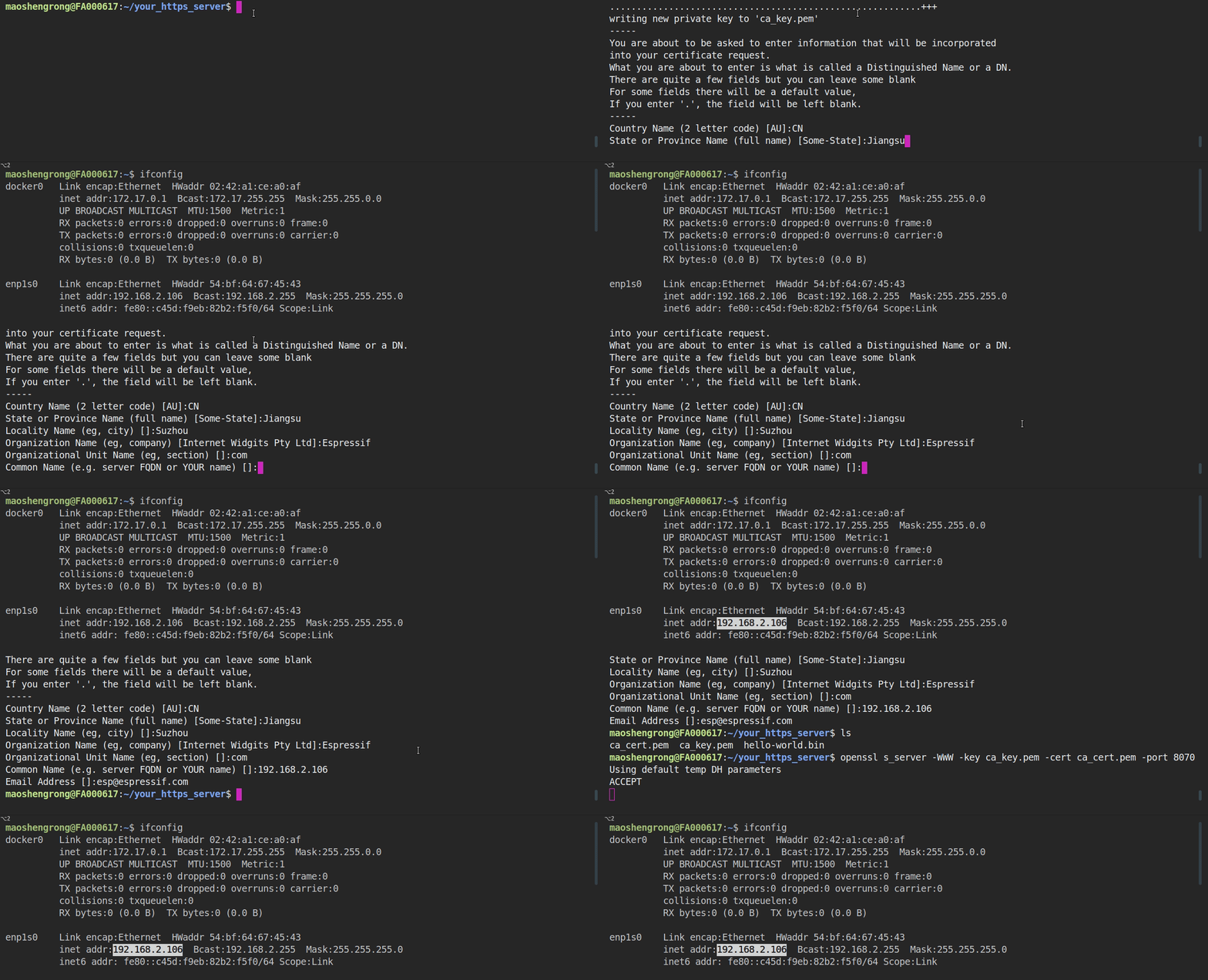
- Enter a directory where holds the root of the HTTPS server, e.g.
cd build. - To create a new self-signed certificate and key, you can simply run command
openssl req -x509 -newkey rsa:2048 -keyout ca_key.pem -out ca_cert.pem -days 365 -nodes.- When prompted for the
Common Name (CN), enter the name of the server that the ESP32 will connect to. Regarding this example, it is probably the IP address. The HTTPS client will make sure that theCNmatches the address given in the HTTPS URL.
- When prompted for the
- To start the HTTPS server, you can simply run command
openssl s_server -WWW -key ca_key.pem -cert ca_cert.pem -port 8070. - In the same directory, there should be the firmware (e.g. hello-world.bin) that ESP32 will download later. It can be any other ESP-IDF application as well, as long as you also update the
Firmware Upgrade URLin the menuconfig. The only difference is that when flashed via serial the binary is flashed to the "factory" app partition, and an OTA update flashes to an OTA app partition. - Notes: If you have any firewall software running that will block incoming access to port 8070, configure it to allow access while running the example.
- Notes: For Windows users, you should add
winptybeforeopensslcommand:winpty openssl req -x509 -newkey rsa:2048 -keyout ca_key.pem -out ca_cert.pem -days 365 -nodeswinpty openssl s_server -WWW -key ca_key.pem -cert ca_cert.pem -port 8070
Flash Certificate to ESP32
Before you flash the example, make sure to copy the generated certificate to server_certs directory inside OTA example directory so that it can be flashed into ESP32 together with the firmware, e.g. cp ca_cert.pem ../server_certs/.
cp ca_cert.pem /path/to/ota/example/server_certs/
Internal workflow of the OTA Example
When the example starts up, it will print "Starting OTA example" to the console and then:
- Connect to the AP with configured SSID and Password (Wi-Fi case) or just by Ethernet.
- Connect to the HTTPS server and download the new image.
- Write the image to flash, and configure the next boot from this image.
- Reboot
If you want to rollback to factory app (or the first OTA partition when the factory partition do not exist) after the upgrade, then run the command idf.py erase_otadata. It can erase the ota_data partition to initial state.
Notes: This assumes that the partition table of this project is the one that is on the device.
Output from HTTPS server
FILE:hello-world.bin
ACCEPT
Support rollback
This feature allows you to roll back to the previous firmware if the app is not operable. Option CONFIG_BOOTLOADER_APP_ROLLBACK_ENABLE allows you to track the first boot of the application (see the Over The Air Updates (OTA) article).
For native_ota_example, added a bit of code to demonstrate how a rollback works. To use it, you need enable the CONFIG_BOOTLOADER_APP_ROLLBACK_ENABLE option in menuconfig and under the "Example Configuration" submenu to set "Number of the GPIO input for diagnostic" to manage the rollback process.
To trigger a rollback, this GPIO must be pulled low while the message Diagnostics (5 sec)... which will be on first boot.
If GPIO is not pulled low then the operable of the app will be confirmed.
Support the version of application
For native_ota_example, code has been added to demonstrate how to check the version of the application and prevent infinite firmware updates. Only the application with the new version can be downloaded. Version checking is performed after the very first firmware image package has been received, which contains data about the firmware version. The application version can be taken from three places:
- If
CONFIG_APP_PROJECT_VER_FROM_CONFIGoption is set, the value ofCONFIG_APP_PROJECT_VERwill be used. - Else, if
PROJECT_VERvariable set in project Cmake/Makefile file, its value will be used. - Else, if the
$PROJECT_PATH/version.txtexists, its contents will be used asPROJECT_VER. - Else, if the project is located inside a Git repository, the output of
git describewill be used. - Otherwise,
PROJECT_VERwill be "1".
In native_ota_example, $PROJECT_PATH/version.txt is used to define the version of app. Change the version in the file to compile the new firmware.
Troubleshooting
- Check your PC can ping the ESP32 at its IP, and that the IP, AP and other configuration settings are correct in menuconfig.
- Check if any firewall software is preventing incoming connections on the PC.
- Check whether you can see the configured file (default hello-world.bin), by checking the output of the command
curl -v https://<host-ip-address>:<host-port>/<firmware-image-filename> - If you have another PC or a phone, try viewing the file listing from the separate host.
Error "ota_begin error err=0x104"
If you see this error then check that the configured (and actual) flash size is large enough for the partitions in the partition table. The default "two OTA slots" partition table only works with 4MB flash size. To use OTA with smaller flash sizes, create a custom partition table CSV (look in components/partition_table) and configure it in menuconfig.
If changing partition layout, it is usually wise to run "idf.py erase_flash" between steps.