
 GuEe-GUI
45fe9ee96b
[bsp][rockchip] Port to DM
GuEe-GUI
45fe9ee96b
[bsp][rockchip] Port to DM
|
6 päivää sitten | |
|---|---|---|
| .. | ||
| applications | 1 vuosi sitten | |
| driver | 3 päivää sitten | |
| figures | 5 kuukautta sitten | |
| .config | 3 päivää sitten | |
| Kconfig | 3 päivää sitten | |
| README.md | 3 päivää sitten | |
| README_ZH.md | 3 päivää sitten | |
| SConscript | 3 päivää sitten | |
| SConstruct | 1 vuosi sitten | |
| Taishanpi-RK3566_CN.md | 5 kuukautta sitten | |
| Taishanpi-RK3566_ZH.md | 5 kuukautta sitten | |
| rtconfig.h | 3 päivää sitten | |
| rtconfig.py | 3 päivää sitten | |
README.md
RK3500 BSP Introduction
中文页 | English
1. Introduction
Product Details
https://www.rock-chips.com/a/cn/product/RK35xilie/index.html
Condition
| SoC | Condition | Earlycon |
|---|---|---|
| RK3576 | Support | earlycon=uart8250,mmio32,0x2ad40000 |
| RK3588 | Support | earlycon=uart8250,mmio32,0xfeb50000 |
| RK3562 | - | - |
| RK3568J | Support | earlycon=uart8250,mmio32,0xfe660000 |
| RK3568 | Support | earlycon=uart8250,mmio32,0xfe660000 |
| RK3566 | Support | earlycon=uart8250,mmio32,0xfe660000 |
| RK3506 | - |
2. Compiling
Use the RT-Thread Smart dedicated toolchain to compile:
wget https://github.com/RT-Thread/rt-thread/releases/download/v5.2.0/aarch64-linux-musleabi_for_x86_64-pc-linux-gnu_242520-979be38cba.tar.bz2

sudo tar -xf aarch64-linux-musleabi_for_x86_64-pc-linux-gnu_242520-979be38cba.tar.bz2 -C /opt
After downloading, extract the toolchain to the /opt directory.Then configure your environment variables:
export RTT_CC="gcc"
export RTT_EXEC_PATH="/opt/aarch64-linux-musleabi_for_x86_64-pc-linux-gnu/bin/"
export RTT_CC_PREFIX="aarch64-linux-musleabi-"
export PATH="$RTT_EXEC_PATH:$PATH"
Navigate to the rt-thread/bsp/rockchip/rk3500 directory and enter:
scons --menuconfig
Select and pull the zlib package in the menu:
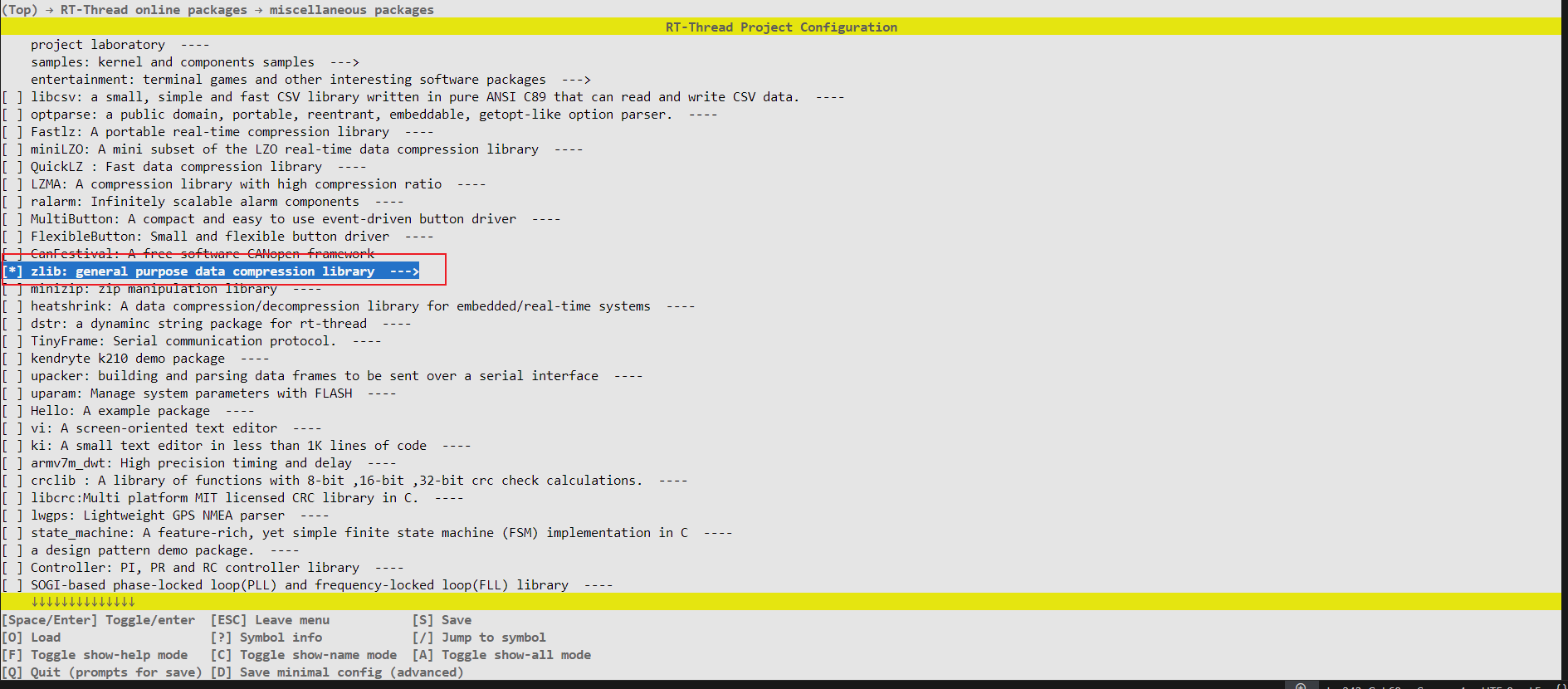
Then run the following commands to fetch packages and build the project:
source  ~/.env/tools/scripts/pkgs --update

scons
3. Execution
The RK3500 SoC uses different methods to install the kernel depending on the board.It is recommended to install and boot from an SD card.The following steps take the Orange Pi Compute Module 4 as an example:
Connect the serial port of the development board:

Open a serial terminal, select the correct serial port, and set the baud rate to 1500000.
Copy the generated rtthread.bin file to the SD card.
Power up the development board and press Ctrl + C on the keyboard to enter U-Boot command line mode.

Enter the following command to load and boot the Smart system:
fatload mmc 1:1 0x480000 rtthread.bin;booti 0x480000 - 0x8300000reading rtthread.bin 1188080 bytes read in 102 ms (11.1 MiB/s) Fdt Ramdisk skip relocation ## Flattened Device Tree blob at 0x08300000 Booting using the fdt blob at 0x08300000 'reserved-memory' linux,cma: addr=10000000 size=800000 'reserved-memory' ramoops@110000: addr=110000 size=f0000 Using Device Tree in place at 0000000008300000, end 000000000832048e Adding bank: 0x00200000 - 0x08400000 (size: 0x08200000) Adding bank: 0x09400000 - 0xf0000000 (size: 0xe6c00000) Adding bank: 0x1f0000000 - 0x200000000 (size: 0x10000000) == DO RELOCATE == Kernel from 0x00280000 to 0x00480000 Total: 107148.892 ms Starting kernel ... [I/rtdm.ofw] Booting RT-Thread on physical CPU 0x0 [I/rtdm.ofw] Machine model: Rockchip RK3566 Orange Pi CM4 Board [I/rtdm.ofw] Earlycon: uart8250 at MMIO/PIO 0x00000000fe660000 (options '') [I/rtdm.ofw] Memory node(1) ranges: 0x0000000000200000 - 0x0000000008400000 [I/rtdm.ofw] Memory node(1) ranges: 0x0000000009400000 - 0x00000000f0000000 [I/rtdm.ofw] Memory node(1) ranges: 0x00000001f0000000 - 0x0000000200000000 [I/mm.memblock] System memory: [I/mm.memblock] [0x0000000000200000, 0x0000000008400000] [I/mm.memblock] [0x0000000009400000, 0x00000000f0000000] [I/mm.memblock] [0x00000001f0000000, 0x0000000200000000] [I/mm.memblock] Reserved memory: [I/mm.memblock] [0x0000000000110000, 0x0000000000200000] [I/mm.memblock] [0x0000000000480000, 0x00000000006c7000] [I/mm.memblock] [0x00000000006c7000, 0x00000000046c7000] [I/mm.memblock] [0x00000000046c7000, 0x00000000048c7000] [I/mm.memblock] [0x00000000048c7000, 0x00000000048e5000] [I/mm.memblock] [0x0000000008300000, 0x000000000831e000] [I/mm.memblock] [0x0000000010000000, 0x0000000010800000] [I/mm.memblock] [0x00000000edf00000, 0x00000000ee367400] [I/mm.memblock] [0x00000000eff00000, 0x00000000eff08000] [I/mm.memblock] physical memory region [0x0000000000200000-0x0000000000480000] installed to system page [I/mm.memblock] physical memory region [0x00000000048e5000-0x0000000008300000] installed to system page [I/mm.memblock] physical memory region [0x000000000831e000-0x0000000008400000] installed to system page [I/mm.memblock] physical memory region [0x0000000009400000-0x0000000010000000] installed to system page [I/mm.memblock] physical memory region [0x0000000010800000-0x00000000edf00000] installed to system page [I/mm.memblock] physical memory region [0x00000000ee368000-0x00000000eff00000] installed to system page [I/mm.memblock] physical memory region [0x00000000eff08000-0x00000000f0000000] installed to system page [I/mm.memblock] physical memory region [0x00000001f0000000-0x0000000200000000] installed to system page [I/mm.memblock] 4191 MB memory installed to system page [I/osi.psci] Using PSCI v1.1 Function IDs [I/clk.rk3568] set cpu_freq to 1800000000 [I/rtdm.ofw] Console: uart0 (fiq-debugger) \ | / - RT - Thread Smart Operating System / | \ 5.2.1 build Apr 28 2025 09:19:08 2006 - 2024 Copyright by RT-Thread team lwIP-2.1.2 initialized! [I/sal.skt] Socket Abstraction Layer initialize success. [I/utest] utest is initialize success. [I/utest] total utest testcase num: (5) [I/drivers.serial] Using /dev/ttyS0 as default console Press any key to stop init process startup ... 3 Press any key to stop init process startup ... 2 Press any key to stop init process startup ... 1 Starting init ... [I/rtdm.mnt] File system initialization done Hi, this is RT-Thread!! msh />I/TC: Secondary CPU 1 initializing I/TC: Secondary CPU 1 switching to normal world boot [I/cpu.aa64] Call cpu 1 on success I/TC: Secondary CPU 3 initializing I/TC: Secondary CPU 3 switching to normal world boot I/TC: Secondary CPU 2 initializing I/TC: Secondary CPU 2 switching to normal world boot [I/cpu.aa64] Call cpu 3 on success [I/cpu.aa64] Call cpu 2 on success msh /> msh />