
 theqengineer
aa79cd8ac5
[bsp][stm32]: correct the errors in README of U series
theqengineer
aa79cd8ac5
[bsp][stm32]: correct the errors in README of U series
|
2 месяцев назад | |
|---|---|---|
| .. | ||
| applications | 2 лет назад | |
| board | 5 месяцев назад | |
| .config | 5 месяцев назад | |
| .gitignore | 2 лет назад | |
| Kconfig | 1 год назад | |
| README.md | 1 месяц назад | |
| README_zh.md | 1 месяц назад | |
| SConscript | 1 год назад | |
| SConstruct | 9 месяцев назад | |
| project.ewd | 2 лет назад | |
| project.ewp | 9 месяцев назад | |
| project.eww | 2 лет назад | |
| project.uvoptx | 2 лет назад | |
| project.uvprojx | 9 месяцев назад | |
| rtconfig.h | 5 месяцев назад | |
| rtconfig.py | 2 лет назад | |
| template.ewp | 2 лет назад | |
| template.eww | 2 лет назад | |
| template.uvoptx | 2 лет назад | |
| template.uvprojx | 2 лет назад | |
README.md
Part 1: STM32 B-U585I-IOT02A Development Board BSP Description
English | 中文
Introduction
This document provides the BSP (Board Support Package) description for the STM32 B-U585I-IOT02A development board, contributed by Zheng-Bicheng.
Main contents include:
- Development board resource introduction
- BSP quick start guide
- Advanced usage
By reading the quick start guide, developers can quickly get started with this BSP and run RT-Thread on the development board. The advanced usage guide will introduce more advanced features to help developers utilize RT-Thread to drive more onboard resources.
Development Board Introduction
STM32 B-U585I-IOT02A is a development board launched by ST based on the ARM Cortex-M33 core, with a maximum frequency of 160 MHz. This development board has rich onboard resources and can fully utilize the performance of the STM32U575 chip.
The development board appearance is shown below:
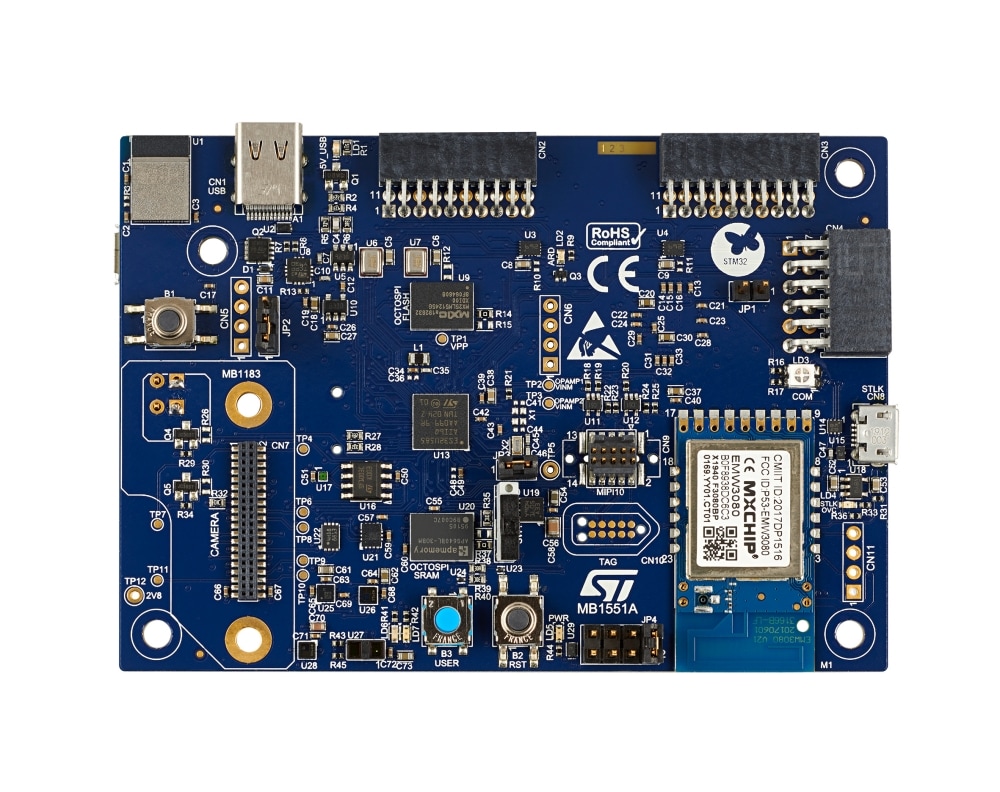
Common onboard resources of this development board include:
- MCU: STM32U585AIIxQ, 160 MHz main frequency, 2048KB FLASH, 786KB RAM
- Common interfaces: USB to serial, USB interface, Arduino interface, etc.
- Debug interface: standard ST-Link
For more detailed information about the development board, please refer to STM32 B-U585I-IOT02A.
Peripheral Support
Current peripheral support status of this BSP:
| Onboard Peripherals | Support Status | Notes |
|---|---|---|
| USB Virtual Serial Port | Supported | |
| On-chip Peripherals | Support Status | Notes |
| GPIO | Supported | |
| UART | Supported | UART1 |
Usage Instructions
The usage instructions are divided into the following two sections:
Quick Start Guide
This section is a usage guide for newcomers to RT-Thread. By following simple steps, you can run the RT-Thread operating system on this development board and see the experimental results.
Advanced Usage
This section is prepared for developers who need to use more development board resources on the RT-Thread operating system. By using the ENV tool to configure the BSP, you can enable more onboard resources and achieve more advanced functions.
Quick Start Guide
This BSP provides MDK5 and IAR projects for developers and supports GCC development environment. The following uses the MDK5 development environment as an example to introduce how to get the system running.
Please Note!!!
Before performing the compilation work, please open ENV and execute the following command (this command is used to pull the necessary HAL library and CMSIS library, otherwise compilation will fail):
pkgs --update
Hardware Connection
Use a data cable to connect the development board to the PC and turn on the power switch.
Compilation and Download
Double-click the project.uvprojx file to open the MDK5 project, compile and download the program to the development board.
The project is configured by default to use the ST_LINK debugger to download the program. After connecting the development board via ST_LINK, click the download button to download the program to the development board.
Running Results
After successfully downloading the program, the system will run automatically and the LED will blink.
Connect the corresponding serial port of the development board to the PC, open the corresponding serial port in the terminal tool (115200-8-1-N), and after resetting the device, you can see the output information of RT-Thread:
 \ | /
- RT -     Thread Operating System
 / | \     4.0.4 build Nov 14 2021 21:15:06
 2006 - 2021 Copyright by rt-thread team
msh >
Advanced Usage
This BSP currently only supports GPIO and UART1 functions. New features will be added in the future.
Notes
Debug serial port is UART1, pin mapping description:
PA9     ------> USART1_TX
PA10     ------> USART1_RX
It is recommended to use a newer version of MDK. This experiment was conducted using MDK5.36.