
 supperthomas
15f8f8f87a
Create main.yml (#3)
supperthomas
15f8f8f87a
Create main.yml (#3)
|
%!s(int64=3) %!d(string=hai) anos | |
|---|---|---|
| .github | %!s(int64=3) %!d(string=hai) anos | |
| date_template | %!s(int64=3) %!d(string=hai) anos | |
| doc | %!s(int64=3) %!d(string=hai) anos | |
| hal | %!s(int64=3) %!d(string=hai) anos | |
| qcloud_iot_explorer_ble | %!s(int64=3) %!d(string=hai) anos | |
| LICENSE | %!s(int64=3) %!d(string=hai) anos | |
| README.md | %!s(int64=3) %!d(string=hai) anos | |
| SConscript | %!s(int64=3) %!d(string=hai) anos |
README.md
LLSync_sdk_adapter
sdk for llsync support on bt stack porting from https://github.com/tencentyun/qcloud-iot-explorer-BLE-sdk-embedded-demo
Now the llsync package support the feature:
- support the rt-thread/bsp/nrf5x in nimble
- support the rt-thread
(RT-THREAD)HOW TO USE IT
git clone rt-thread master:
git clone https://github.com/RT-Thread/rt-thread.git
enter the bsp/nrf5x/nrf52832/
menuconfig
select this package in menuconfig
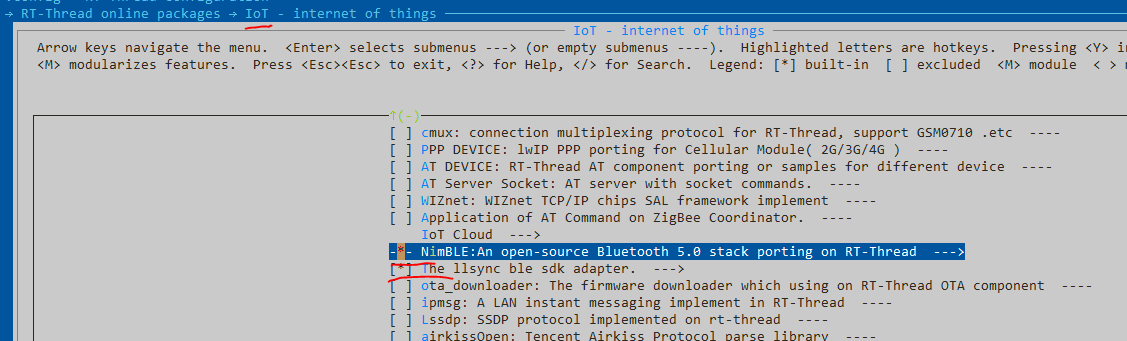
this package must use the nimble bluetooth stack.
then use the command download the package
pkgs --update
then build the mdk5 project
scons --target=mdk5
then build burn it with keil project
enter the shell
the cmd ble_llsync, will start the ble sample
msh >ble_llsync
[I/nimble] GAP procedure initiated: stop advertising.
[I/nimble] GAP procedure initiated: stop advertising.
[I/nimble] ===ble_advertising_stop==197=====
[I/nimble] GAP procedure initiated: advertise; disc_mode=2 adv_channel_map=0 own_addr_type=0 adv_filter_policy=0 adv_itvl_min=0 adv_itvl_max=0
qiot info: start wait advertising
msh >[I/nimble] connection established; status=0, handle:1
[I/nimble] subscribe event; cur_notify=1
 value handle; val_handle=7
[I/nimble] ===gatt_svr_chr_access_q_device_info==58====
[I/nimble] ===ble_send_notify==204==len:14==notify_conn_handle:1=
[I/nimble] GATT procedure initiated: notify; att_handle=7
[I/nimble] ===ble_send_notify==204==len:9==notify_conn_handle:1=
[I/nimble] GATT procedure initiated: notify; att_handle=7
[I/nimble] ===gatt_svr_chr_access_q_device_info==58====
[I/nimble] subscribe event; cur_notify=0
 value handle; val_handle=7
[I/nimble] disconnect; reason=531
then , use the wechat (lianlian ) to config the ble device
you can control the led light with your wechat.