
 kurisaw
97e1a5f143
Fix version issues
kurisaw
97e1a5f143
Fix version issues
|
8 месяцев назад | |
|---|---|---|
| docs | 5 лет назад | |
| drivers | 8 лет назад | |
| extmod | 5 лет назад | |
| lib | 5 лет назад | |
| port | 8 месяцев назад | |
| py | 4 лет назад | |
| tools | 6 лет назад | |
| .gitignore | 6 лет назад | |
| LICENSE | 8 лет назад | |
| README.md | 5 лет назад | |
| README_ZH.md | 5 лет назад | |
| SConscript | 2 лет назад |
README.md
MicroPython
中文页 | English
1. Introduction
This is a port of MicroPython on RT-Thread, which can run on RT-Thread 3.0 or higher. This software package can run MicroPython on embedded systems equipped with RT-Thread.
If it is the first time to come into contact with RT-Thread MicroPython, it is recommended that you use RT-Thread officially supported development boards to get started quickly. These development boards have complete firmware functions and provide source code, suitable for introductory learning, and officially support development boards firmware download Please click on me.
1.1 Directory structure
| Name | Description |
|---|---|
| docs | Document directory, including getting started guide and development manual |
| drivers | MicroPython source code directory |
| extmod | MicroPython Source Code Directory |
| lib | MicroPython source code directory |
| py | MicroPython source code directory |
| port | Porting code directory |
| LICENSE | Micropython MIT License |
1.2 License
RT-Thread MicroPython follows the MIT license, see the LICENSE file for details.
1.3 Dependency
- RT-Thread 3.0+
2. How to open RT-Thread MicroPython
To use MicroPython package, you need to select it in the RT-Thread package manager. The specific path is as follows:
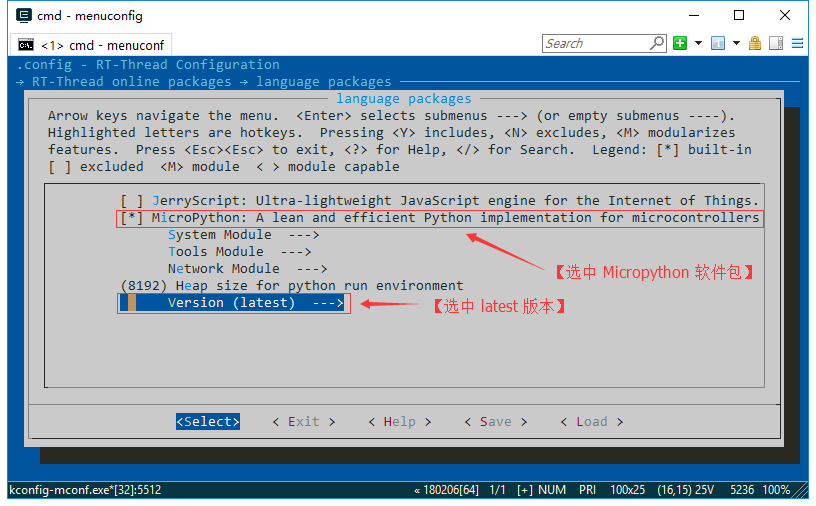
Then let the RT-Thread package manager automatically update, or use the pkgs --update command to update the package to the BSP.
3. Use RT-Thread MicroPython
3.1 Add software package to project
After selecting MicroPython package, when compiling with bsp again, it will be added to the bsp project for compilation.
For firmware development, please refer to 《MicroPython Firmware Development Guide》
For more MicroPython documentation, please visit RT-Thread Documentation Center
3.2 Using MicroPython IDE
RT-Thread MicroPython IDE provides a powerful development environment for MicroPython, which can be directly searched and downloaded through the VScode application store. Examples are as follows:

3.3 Add C extension to MicroPython
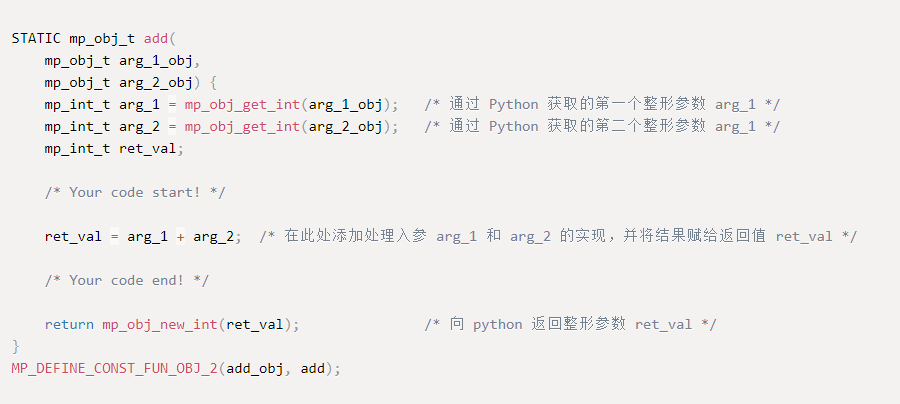
In order to facilitate users to add their own C functions to MicroPython to be called by Python scripts, RT-Thread provides MicroPython C binding code automatic generator For everyone to use. With this tool, users only need a few simple steps to achieve C function extension. The following figure shows the form of the automatically generated C code.
4. Matters needing attention
- Need to use RT-Thread 3.0 or above
- Select the
latestversion ofMicropythonin themenuconfigoption - Currently, the
ffimodule underSystem Moduleonly supports GCC toolchain, and relevant information needs to be added to the link script