
 SummerGift
7da95a802b
【完善】english 说明
SummerGift
7da95a802b
【完善】english 说明
|
пре 6 година | |
|---|---|---|
| .. | ||
| assets | пре 6 година | |
| MicroPython_Firmware_Development_Guide.md | пре 6 година | |
| MicroPython_IDE_User_Manual.md | пре 6 година | |
| README.md | пре 6 година | |
README.md
VSCode 最好用的 MicroPython 插件
介绍 (English)
VSCode 最好用的 MicroPython 插件,为 MicroPython 开发提供了强大的开发环境,主要特性如下:
- 便捷的开发板连接方式(串口、网络、USB)
- 支持基于 MicroPython 的代码智能补全与语法检查
- 支持 MicroPython REPL 交互环境
- 提供丰富的代码示例与 demo 程序
- 支持全工程同步功能
- 支持在设备上运行示例代码文件
- 支持代码片段运行功能
- 支持多款主流 MicroPython 开发板
- 支持 windows 及 ubuntu 操作系统
开发板支持列表
| 编号 | 开发板名称 | 固件获取方式 |
|---|---|---|
| 1 | 潘多拉 IoT Board 物联网开发板 STM32L475 | RT-Thread 论坛固件汇总贴 |
| 2 | 正点原子 W601 WIFI 物联网开发板 | RT-Thread 论坛固件汇总贴 |
| 3 | 正点原子探索者 STM32F407 开发板 | RT-Thread 论坛固件汇总贴 |
| 4 | ESP8266 | 官方下载链接 |
| 5 | ESP32 | 官方下载链接 |
| 6 | PYboard | 官方下载链接 |
| 7 | others | 官方下载链接 |
编号为 1、2、3 的开发板的固件由 RT-Thread 官方提供,同时针对 MicroPython 插件开发环境进行 深度优化 ,提供强大的工程同步功能以及更加丰富的固件功能。
欢迎加入RT-Thread MicroPython 交流 QQ 群 703840633 交流 MicroPython 技术。
您还可以登陆 RT-Thread 官方论坛 Micropython 专区 或者向 email : SummerGift@qq.com 发送邮件反馈宝贵的使用意见和建议,我们会第一时间根据您的反馈改进插件的使用体验。
准备工作
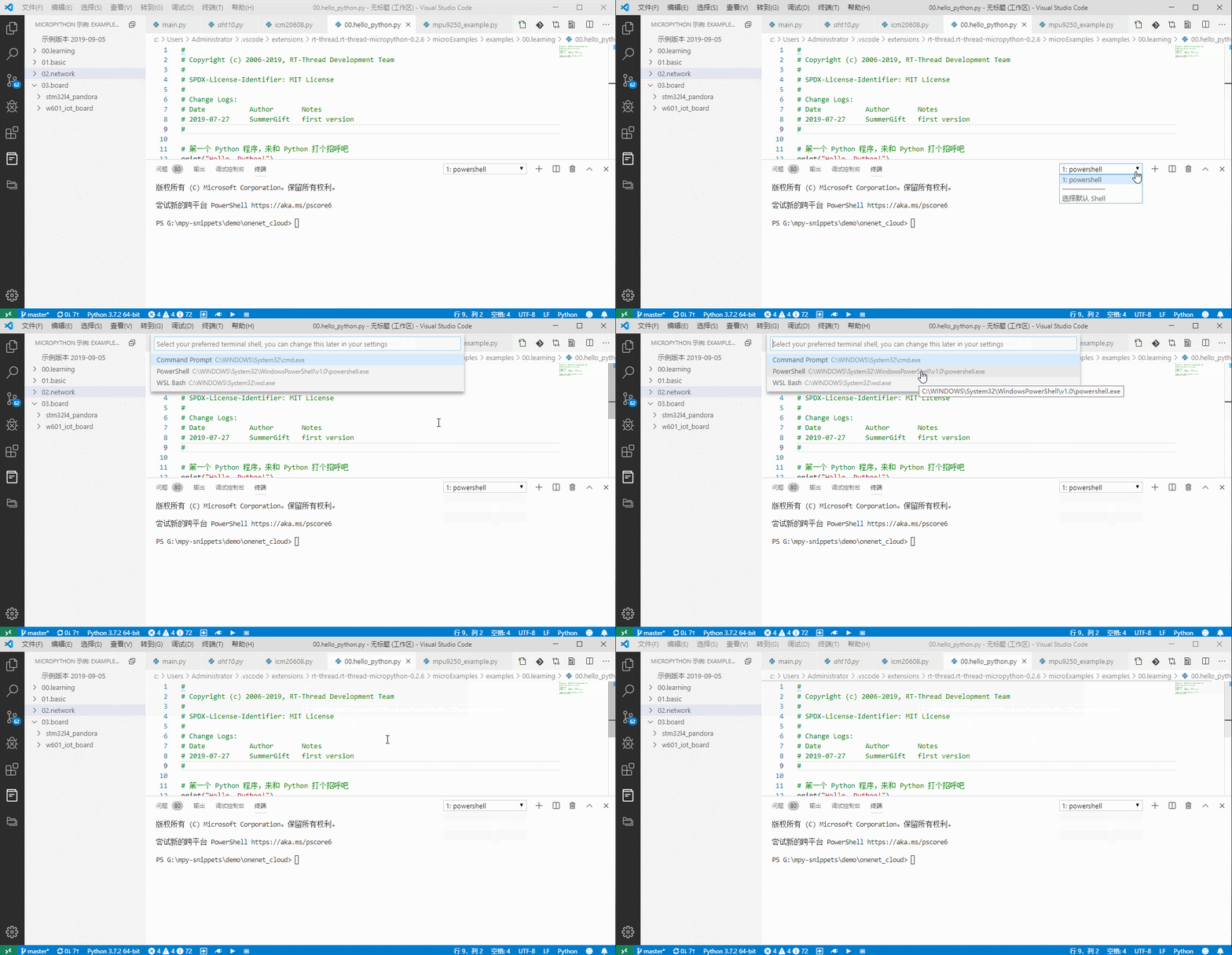
- 在 windows 操作系统下使用插件需要将 vscode 的默认终端修改为 powershell,如下图所示:
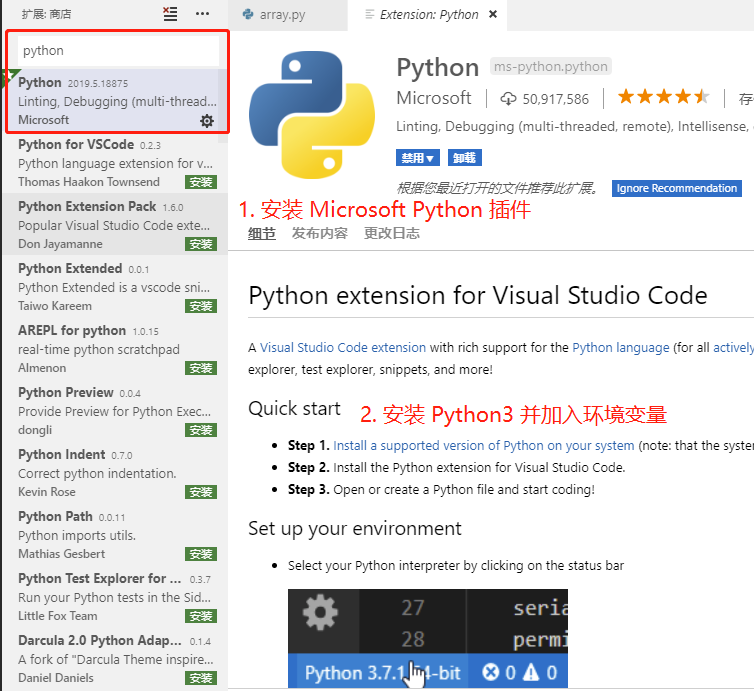
如果想要使用 MicroPython 自动补全功能(如果暂时不需要自动补全功能,可以跳过后续步骤),还需要进行如下操作:
安装 Python 插件
按照 Python 插件的提示在 PC 上安装 Python3 并加入到系统环境变量中
如果在 PC 上已经安装过上述插件和程序,可以跳过此准备步骤。
ubuntu 支持
本插件支持在 ubuntu 18.04 版本下运行,为了避免在 ubuntu 系统下频繁获取串口权限,需要将当前用户加入到 dialout 用户组中,手动输入如下命令即可,$USERNAME 是系统当前用户名:
sudo usermod -aG dialout $USERNAME
注意:配置修改后需要 重启一下操作系统 使配置生效。
快速上手
创建 MicroPython 工程
MicroPython 开发的第一步是创建 MicroPython 工程,后续所有操作都必须在工程内才能运行。创建一个新的 MicroPython 工程有两种方式,分别是创建一个空白工程和基于 Demo 创建工程,下面展示这两种方式。
创建一个空白 MicroPython 工程

创建一个基于 Demo 的 MicroPython 工程
通过该功能可以创建一个基于 demo 的 MicroPython 工程,开发者可以直接运行该 Demo 工程或者在该 Demo 的基础上实现自己想要的功能。

Weather Show Demo 在开发板上的运行效果

该 Demo 全部代码使用 MicroPython 编写,可以在 潘多拉 IoT Board 开发板 和 正点原子 W601 WIFI 物联网开发板 上直接下载运行。
连接开发板
点击左下角的连接按钮,然后在弹出的设备列表中选择想要连接的设备,即可连接 MicroPython 开发板。

查看示例代码文件
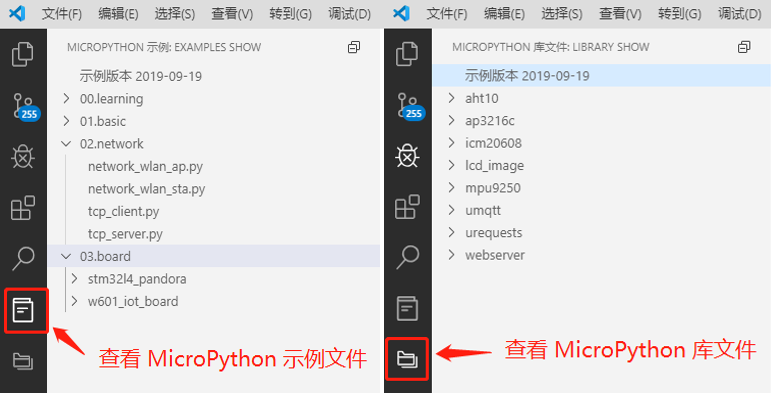
MicroPython 插件提供丰富的示例代码,可在左侧活动栏中查看示例代码和库文件。
在设备上运行 MicroPython 文件
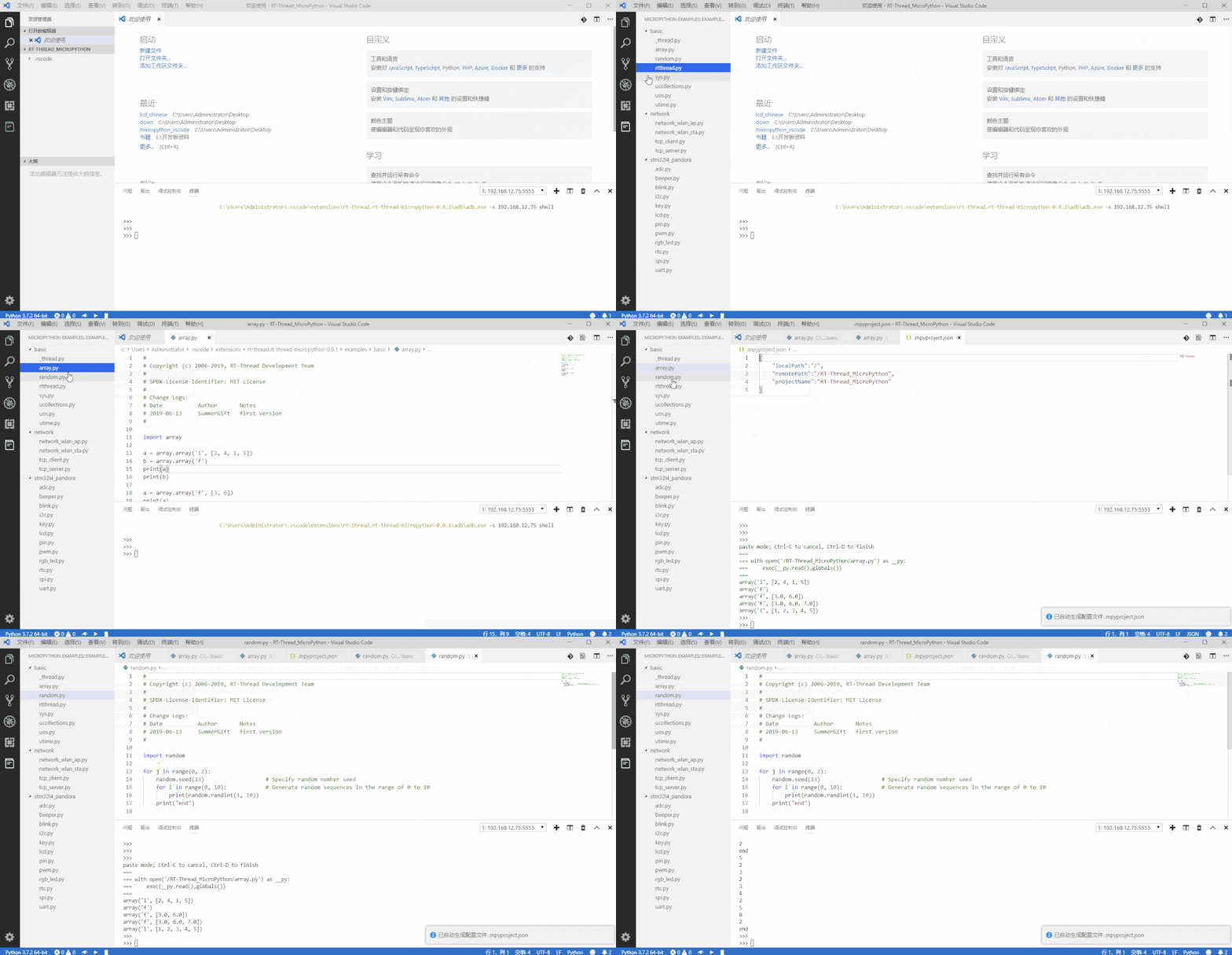
开发板连接成功后,在示例代码文件上单击右键,在菜单中选择 下载并在设备上运行该 MicroPython 文件,即可将示例文件下载到开发板中并运行,如下图所示:
在开发板上运行 MicroPython 代码片段
如果只是想进行代码量不大的代码调试,而不想将文件下载到开发板上,那么可以使用 代码片段 功能。在编辑器中选中想要运行的代码片段,然后在右键下拉菜单中选择 在设备上执行选中的 MicroPython 代码 选项,即可在 REPL 环境中运行所选代码。
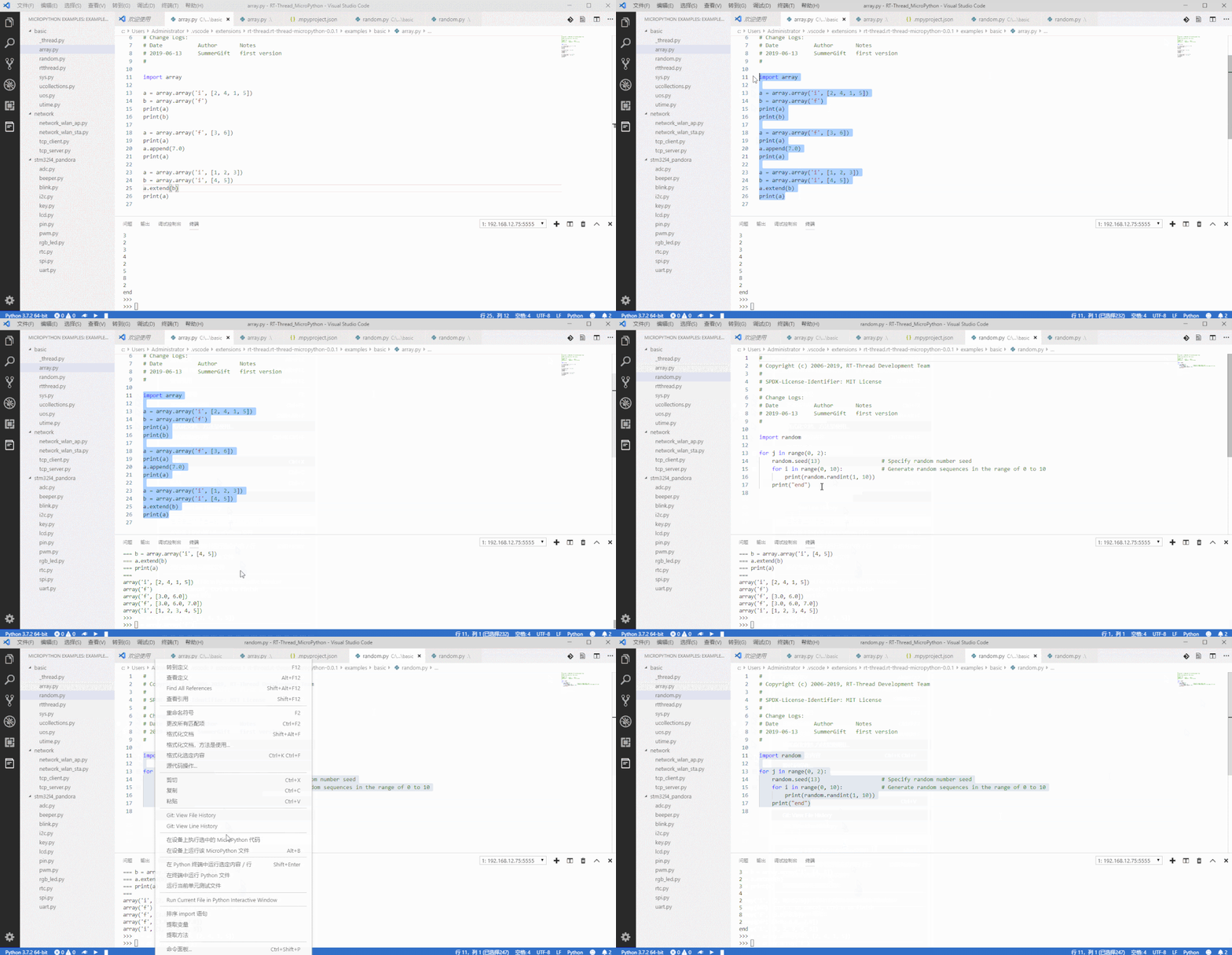
基于 MicroPython 的代码智能补全
本插件支持基于 MicroPython 语法的代码智能补全和语法检查,这一强大功能对于开发 MicroPython 代码十分实用。它可以让开发者在编写函数的同时查看 API 参数提示,同时它给出的醒目提示也让开发者更易于查找代码中的错误。

开发资源
- RT-Thread MicroPython 开发用户手册
- RT-Thread MicroPython 软件包
- RT-Thread MicroPython 示例程序及库
- RT-Thread MicroPython 论坛
- MicroPython IDE 用户指南
- MicroPython 固件开发指南
注意事项
- 不要删除工程目录下的
.mpyproject.json文件,该文件是 MicroPython 工程的配置文件,删除后将无法正常运行 MicroPython 代码程序。
The best MicroPython plug-in of vscode
Introduction
RT-Thread MicroPython is the best micropython plug-in in VScode, which provides a powerful development environment for MicroPython development. The main features are as follows:
- Convenient connection mode of development board (serial port, network, USB)
- Support MicroPython-based code intelligent completion and syntax check
- Support MicroPython REPL interactive environment
- Provides many code samples and demo program
- Support full project synchronization function
- Support for running sample code files on devices
- Supports code snippets to run functions
- Supports several major MicroPython development boards
- Support Windows and ubuntu operating systems
Development board support list
| number | Name of development board | Firmware acquisition |
|---|---|---|
| 1 | 潘多拉 IoT Board 物联网开发板 STM32L475 | RT-Thread 论坛固件汇总贴 |
| 2 | 正点原子 W601 WIFI 物联网开发板 | RT-Thread 论坛固件汇总贴 |
| 3 | 正点原子探索者 STM32F407 开发板 | RT-Thread 论坛固件汇总贴 |
| 4 | ESP8266 | Official download link |
| 5 | ESP32 | Official download link |
| 6 | PYboard | Official download link |
| 7 | others | Official download link |
The firmware for the development boards numbered 1, 2, and 3 is provided by rt-thread, and is also optimized for the MicroPython plug-in development environment to provide powerful engineering synchronization and richer firmware features.
Preparation
- Using plug-in under the Windows operating system requires changing the default terminal of vscode to powershell, as shown below:
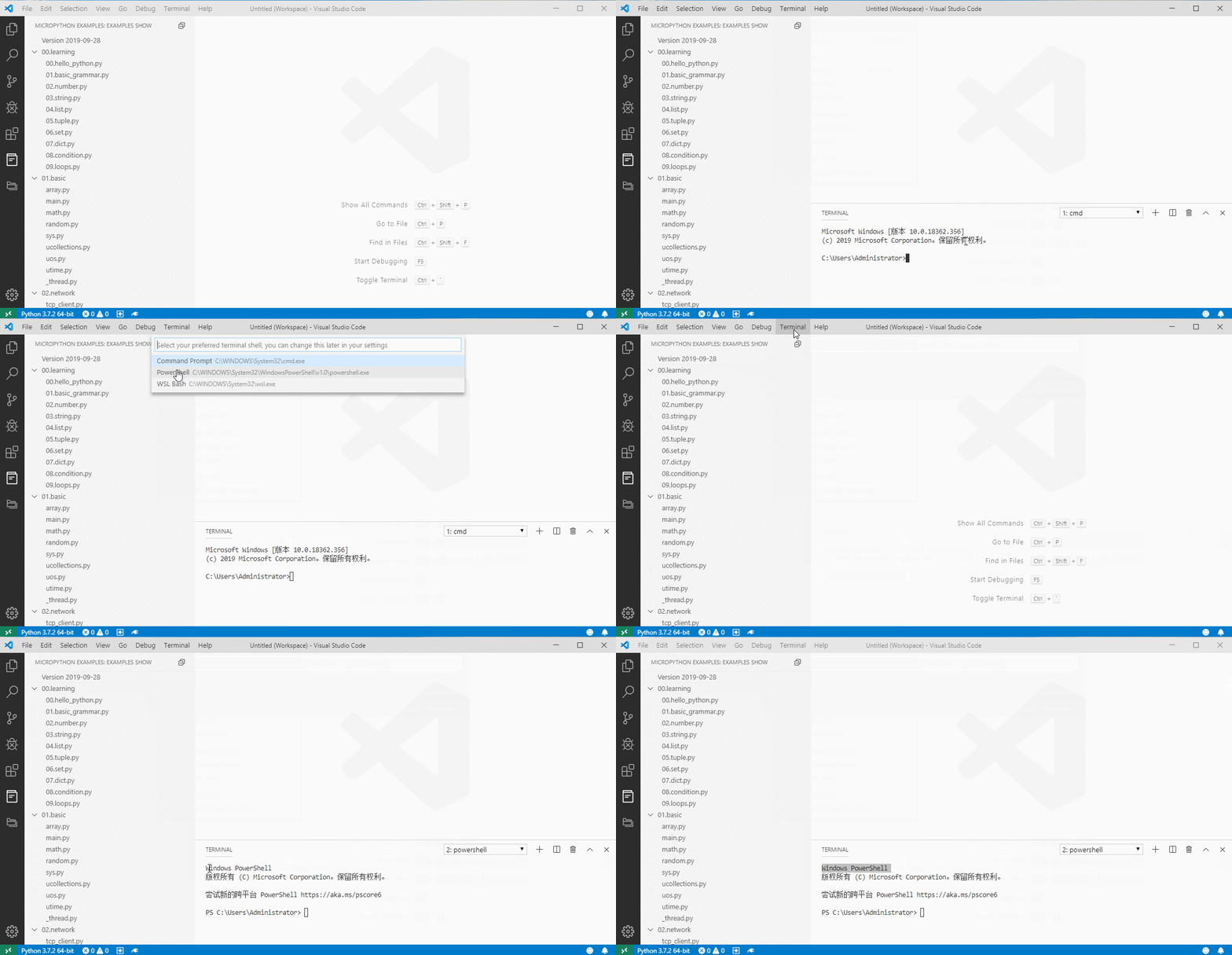
If you want to use the MicroPython autocompletion feature (you can skip the next step if you don't need autocompletion for now), you need to do the following:
Install the Python plug-in
Install Python3 on your PC and add it to the system environment variables as instructed by the Python plug-in
If you already have the above plug-ins and programs installed on your PC, you can skip this preparation step.
Ubuntu support
This plug-in supports running under ubuntu 18.04. In order to avoid frequent access to serial port permissions under ubuntu system, the current user needs to be added to the user group dialout. Manually enter the following command: $USERNAME is the current USERNAME of the system:
sudo usermod -ag dialout $USERNAME
Note: the configuration change requires to restart the operating system for the configuration to take effect.
Quick Start
Create a MicroPython project
The first step in MicroPython development is to create a MicroPython project within which all subsequent operations must run. There are two ways to create a new MicroPython project, a blank project and a demo-based project, which are shown below.

Connecting development board
You can connect to the MicroPython development board by clicking the connection button in the lower left corner and then selecting the device you want to connect to in the pop-up list of devices.

View the sample code file
The MicroPython plug-in provides a wealth of sample code and library files to view in the left active bar.
Run the MicroPython file on the device
After successful connection of the development board, right click on the sample code file, select 'download and run the MicroPython file' on the device from the menu, and the sample file can be downloaded to the development board and run, as shown below:

Run MicroPython code snippets on the development board
If you just want to debug a small amount of code without downloading files to the development board, you can use the code snippet function.You can run the selected code in the REPL environment by selecting the snippet you want to run in the editor, and then selecting the 'execute the selected MicroPython code' option on the device from the right-click menu.

Intelligent code completion based on MicroPython
This plug-in supports intelligent code completion and syntax checking based on MicroPython syntax, which is a powerful tool for developing MicroPython code.It allows developers to write functions while looking at API parameter hints, and it gives them a visual reminder that makes it easier to find errors in code.
Matters needing attention
- Do not delete the
.mpyproject.jsonfile in the project directory. This file is the configuration file of the MicroPython project.
Contact & Supports
- Github
- Support Email : SummerGift@qq.com